Webhooks
Here's a comprehensive documentation guide for integrating and managing webhooks in Fluxvend. This guide will walk developers through the setup, security, and usage of webhooks for linking POS card transactions or bank transactions to a sales order in Fluxvend. 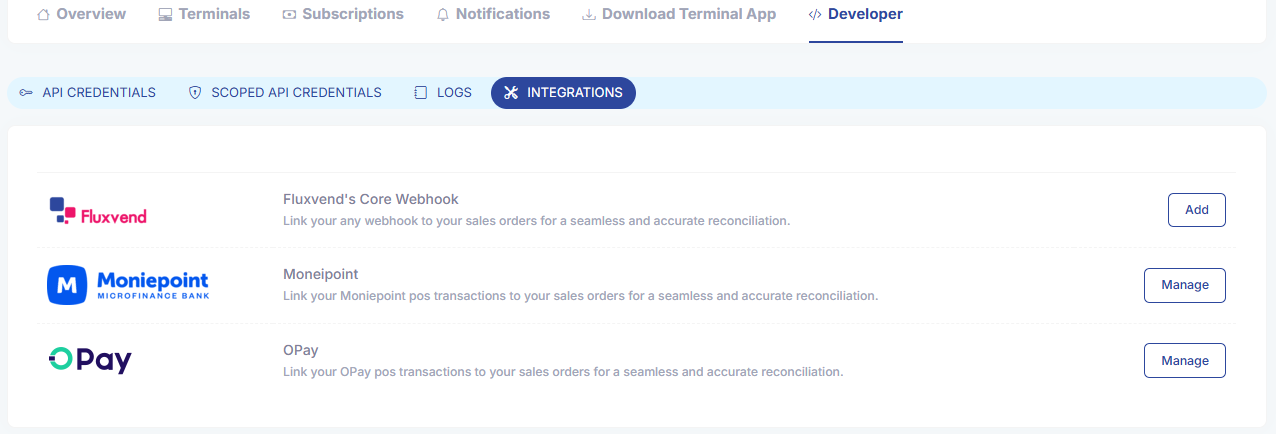
Overview
Fluxvend's webhooks allow you to seamlessly link POS card transactions or bank transactions to a sales order within Fluxvend. This dynamic and secure webhook system ensures that your transactions are accurately mapped to your inventory sales orders, offering both flexibility and robust security features.
Webhook Security
Fluxvend's webhook system employs multiple layers of security:
IP Whitelisting: Only requests from IP addresses that have been explicitly whitelisted will be accepted.
API Signature: For Fluxvend’s core webhook, each request must include a signature generated using HmacSHA256 and your API secret key. This signature is sent in the
Signatureheader.
Generating the API Signature
To authenticate your webhook request, you'll need to create an HmacSHA256 hash of the request payload using your API secret key and then encode the result in Base64. This signature is included in the Signature header of the request.
Here’s how to generate the signature:
Create an HmacSHA256 hash using your API secret key + Api Secret.
Compute the Base64 hash of the HmacSHA256 result.
Include the Base64-encoded signature in the
Signatureheader of your webhook request.
Request Payload
The request payload is the data you send to the webhook endpoint. The endpoint accepts json data, which can include transaction details, order information, or any other relevant data you want to link to a sales order in Fluxvend.
Example
Here’s an example of how you might generate the signature:
Managing Webhooks
Enabling and Configuring Webhooks
To start using webhooks in Fluxvend, follow these steps:
Login to the Admin Portal: Navigate to the Fluxvend Admin Portal.
Go to the Developer Page:
Click on your company logo at the top right of the page.
Select your account name from the dropdown.
Navigate to the Developer tab.
Access the Integrations Section:
Within the Developer tab, go to the Integrations section.
Here, you will see options to enable different webhooks.
Webhooks are disabled by default. Click on the Add button to enable them.
Manage Webhooks:
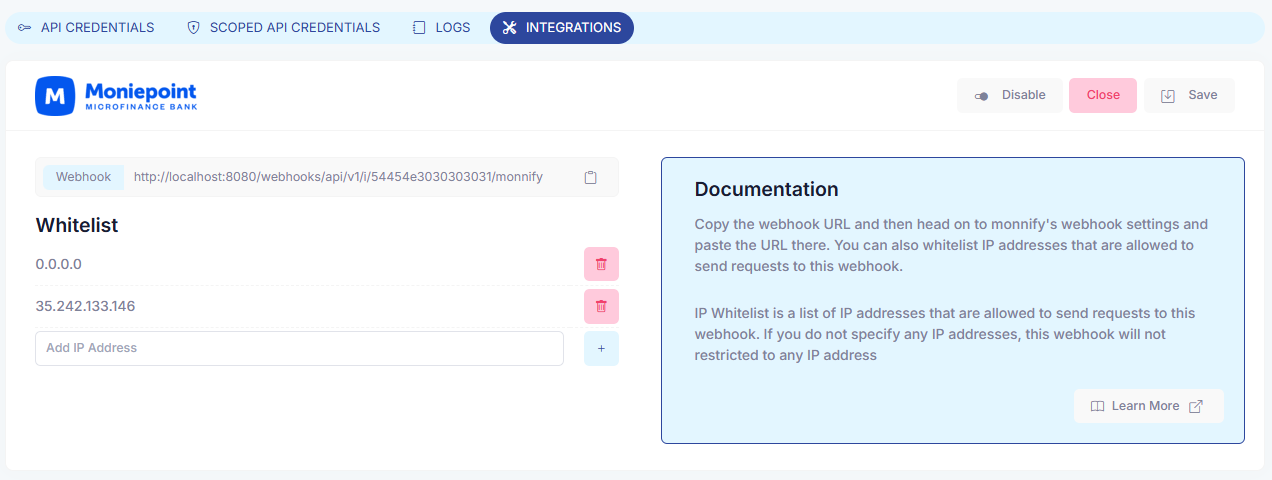
After enabling a webhook, you will be redirected to the management page.
On this page, you can copy your webhook url, whitelist IP addresses, manage your API credentials, and disable webhooks when they are no longer needed.
Supported Webhooks
Fluxvend Core Webhook:
Purpose: Link external payment transactions from any source to a sales order in Fluxvend.
Security: Requires both IP whitelisting and API signature in the request header.
Monnify Webhook:
Purpose: Integrate Monnify POS card terminal transactions, bank transfers, and other payment methods with Fluxvend's sales orders.
Security: Requires IP whitelisting (API signature not required).
Opay Webhook:
Purpose: Integrate Opay POS card terminal transactions, bank transfers, and other payment methods with Fluxvend's sales orders.
Security: Requires IP whitelisting (API signature not required).
Webhook Management Capabilities
Fluxvend provides extensive management capabilities for your webhooks:
Regenerate Secret: You can regenerate the secret key for your API credentials.
Delete Scoped Credentials: Remove any scoped credentials that are no longer in use.
Add Scoped Credentials: Add up to 5 scoped credentials for specific use cases.
IP Whitelisting: Secure your webhook by specifying which IP addresses are allowed to send requests.
Disable/Enable Webhooks: Temporarily disable webhooks when not in use. Remember, disabling will delete them, so reconfiguration is necessary upon re-enabling.
This documentation guide will help developers integrate, secure, and manage their webhooks effectively within Fluxvend. If you need more detailed examples or further customization, feel free to reach out!