API Authentication Guide
This guide provides an overview of the authentication and authorization mechanisms implemented in your application, including how to secure API requests using API keys and secrets.
Overview
The Fluxvend API allows third-party applications to interact with your inventory management system. This document outlines the authentication and authorization process required to access the Fluxvend API securely.
Authentication Types
Fluxvend API offers two types of API credentials:
Default Credentials:
Scope: Full access to all API endpoints.
Use Case: These credentials are automatically generated by the system and should never be shared. They have unrestricted access and should only be used for internal purposes or server-to-server communication.
Scoped Credentials:
Scope: Limited access, defined by specific scopes.
Use Case: These credentials can be safely shared with third-party applications, as their access is restricted to the scopes you define.
Key Features
API Key and Secret Management: Generates secure API keys and secrets, validates them, and manages their lifecycle.
IP Whitelisting: Supports IP-based access restrictions, allowing requests only from specified IP addresses.
Scope and Permission Management: Enforces security policies based on the scopes associated with API credentials.
Tenant Resolution: Resolves the tenant associated with an API key, ensuring that the correct tenant context is used for each request.
Managing API Credentials
You can manage your API credentials through the Fluxvend Admin Portal. Follow these steps to generate and manage your API keys: 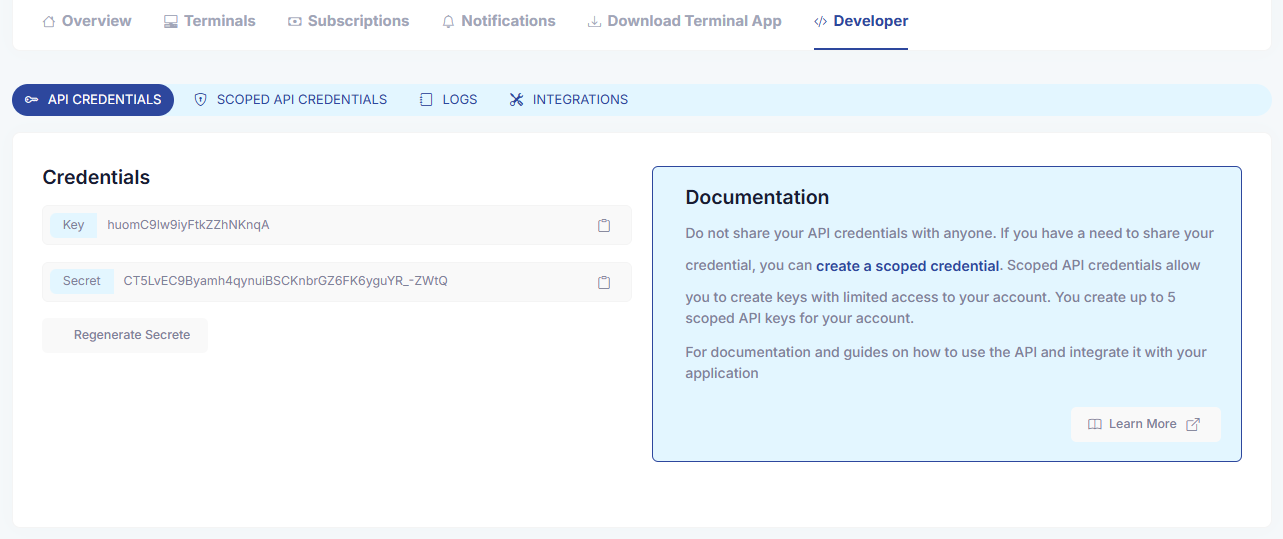
Login to the Fluxvend Admin Portal.
Navigate to the top-right corner and click on the company logo.
From the dropdown menu, click on your Account menu.
Go to the Developer tab, where you'll find two sections:
Default Credentials: System-generated, full-access credentials. Only one default credential is allowed per account.
Scoped Credentials: Create up to 5 scoped credentials with defined permissions. These credentials are ideal for third-party integrations.
Actions Available in the Developer Portal
Within the Developer Portal, you can manage your API credentials by performing the following actions:
Generate New Scoped Credentials: Define scopes for third-party integrations.
Regenerate Secret: Update the secret for added security.
Delete Scoped Credentials: Remove credentials no longer in use.
Whitelist IPs: Restrict API access to specific IP addresses.
View API Logs: Investigate API requests made using your credentials.
Making API Requests
To authenticate your requests, you need to include an Authorization token in the HTTP header. The Authorization token is created by concatenating your API key and secret with a colon (:) and encoding the result using Base64.
Example of Creating an Authorization Token
Here’s an example of how to create and include the Authorization token in your request:
Example API Request
Below is an example of how you might implement an API request using different programming languages:
Managing API Logs
Fluxvend provides a logging feature to track all HTTP requests made using your API credentials. This can be invaluable for monitoring usage, investigating issues, and ensuring that your API credentials are used appropriately.
To view the logs:
Login to the Fluxvend Admin Portal.
Navigate to the Developer tab.
Select the Logs tab to view a detailed history of API requests, including the credentials used, the endpoints accessed, and the IP addresses that made the requests.
Error Handling
The Fluxvend API uses standard HTTP status codes to indicate the success or failure of API requests. Below are some of the key error codes related to authentication:
401 Unauthorized: Invalid API key or secret.
403 Forbidden: The request is valid, but access is restricted due to scope or IP restrictions.
429 Too Many Requests: The client has exceeded the allowed API rate limit.
Best Practices
Rotate API Keys Regularly: Regularly regenerate your API keys and secrets to maintain security.
Use Scoped Credentials: For third-party integrations, always use scoped credentials to minimize the risk of unauthorized access.
Secure Storage: Store your API keys and secrets in secure environments, such as environment variables or secret management systems.
IP Whitelisting: Use IP whitelisting to restrict API access to trusted IP addresses.
Conclusion
By following this guide, you can ensure that your application’s API is secure and that only authorized users or services have access to your resources.